

One Merchant Update Can Power Multiple Outputs

You finally get the email you’ve been waiting for: a restaurant at your property shares details for their weekend patio event. Live music. A seasonal menu. A great flyer.
You format the text, drop in the image, add it to the weekly newsletter, and hit send.
Then the weekend passes. And by Monday, you’re right back to chasing merchants for the next newsletter cycle.
If this feels familiar, you don’t have a content problem. You have a content flow problem — and your merchant content system is probably built on scattered inputs and one-off publishing.
Merchants are doing great things every day. The issue is that the information shows up in too many places, gets cleaned up too many times, and only gets used once.
The fix isn’t “post more.” The fix is capture once, approve once, reuse everywhere.

The problem with one-off publishing
When merchant updates are handled manually, the workflow gets messy fast:
emails
texts
flyers
DMs
last-minute calls
“Can you resend that photo?”
“What time was it again?”
Before any marketing happens, your team is stuck doing administrative catch-up: finding links, confirming dates, requesting high-res images, rewriting copy, and getting approvals.
Then — after all that work — the update usually stops at a single output:
one newsletter blurb
or one social post
or one website update
That’s where the value gets capped.
You did the heavy lifting once, but you only got one marketing asset out of it.
For retail and mixed-use properties, this creates real downstream impact:
less tenant visibility (and weaker tenant relationships)
fewer “reasons to visit” pushed to the community
less proof for ownership and stakeholders
fewer stories leasing can use to show post-lease support
Build a merchant content system that publishes smarter
To fix the content flow problem, you don’t need more channels. You need a better intake path.
The simplest philosophy is:
Submit once. Publish smarter.
Instead of accepting updates through texts and scattered emails, guide merchants to one intake form that collects the same details every time:
what’s happening
when it’s happening
where to send people
what visuals to use
what the merchant wants promoted
From there, every submission flows into a central tracker (your “content runway”). That tracker becomes the shared view for marketing, management, and leasing.
Once the update is reviewed and approved one time, it becomes a reusable asset that can feed multiple channels without rework.
This is how you turn tenant activity into:
consistent newsletters
stronger community visibility
better internal coordination
easier monthly reporting
a more credible leasing story
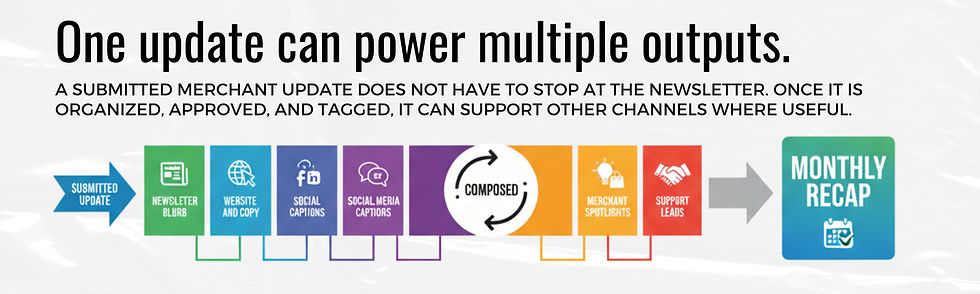
What One Merchant Update can become
When you build your workflow around “submit once, publish smarter,” one merchant update becomes a multi-channel asset.
Here are 10 practical outputs you can generate from one structured update: | |
1) Newsletter blurb | The fastest win. Since the intake already captured the essentials, formatting it into a clean newsletter block takes minutes. |
2) Social media captions | You already have the hook and the image. You’re not starting from scratch — you’re adapting approved copy. |
3) Event listing | If there’s a date, it can become a web calendar item, community listing, or “what’s happening this weekend” placement. |
4) Website copy | Seasonal menus, store updates, promotions, and events are exactly what keep a property site fresh and relevant. |
5) Merchant spotlight | Some updates deserve a bigger story (anniversaries, charity drives, grand reopenings). One submission can expand into a spotlight post. |
6) Campaign participation notes | Holiday, back-to-school, summer series — merchant updates become proof of participation you can bundle into campaign messaging. |
7) Support requests | Sometimes the update tells you what a merchant needs (“We need help promoting this”). A structured intake makes those needs visible. |
8) Management recap | A clean weekly list of submitted updates shows what’s active across the property — and what still needs follow-up. |
9) Leasing stories | Leasing doesn’t just sell square footage — they sell the ecosystem. Showing how your property amplifies merchants is a real differentiator. |
10) Monthly report items | Stakeholder reporting is easier when you’ve captured the work as it happens. Pull updates directly from the tracker to show activity and momentum. |
Not every update needs every output

A list of 10 outputs can feel like “more work,” but that’s not the point.
The goal is flexibility.
A minor weekday lunch special might only need a newsletter mention. A major weekend event might deserve:
newsletter placement
an event listing
social captions
a post-event recap entry for the monthly report
The system doesn’t force you to post everywhere.
It makes approved content easy to reuse when it’s actually useful.
You do the clean-up work once. Then the content sits ready and waiting — for the next channel, the next campaign, or the next report.
The content tracker is the missing link
The bridge between a raw merchant submission and a polished content engine is your tracker.
Your tracker should answer three questions at a glance:
What came in?
What’s ready?
What’s missing / blocked?
Recommended statuses (simple, operational, easy to maintain):
Submitted (intake received)
Needs Info (missing link, image, date, etc.)
In Review (editing for clarity and brand voice)
Approved (final copy is ready to use)
Used in Newsletter (primary output completed)
Repurposed (adapted for web / social / listings)
Support Needed (merchant needs additional help)
Reported (included in monthly recap)
This tracker isn’t just for marketing. It’s a shared visibility layer that supports the full property team:
marketing sees better inputs and faster publishing
management sees what needs attention and follow-up
leasing gets a stronger tenant support story
merchants get a clearer path to participate (and request help)
Start with one cycle
You don’t need a massive overhaul to prove value.
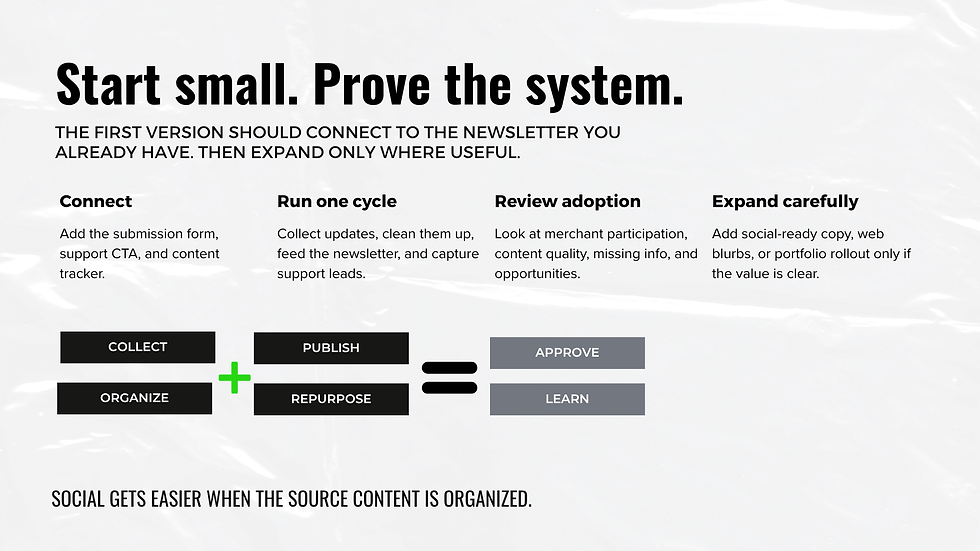
Start small. Prove the system.
Best first test | Run one cycle, then review | Then expand only where useful |
one property | merchant participation | social-ready copy |
one newsletter cycle | content quality | web blurbs |
one intake form | missing info patterns | portfolio rollout |
one tracker | how much time your team saved | deeper reporting |
one monthly recap pull | what outputs were most worth repurposing |
Make your next update work harder
A strong merchant content system removes friction from retail property marketing. It gives merchants an easier way to share what they’re already doing — and it gives your team a repeatable way to turn those updates into newsletters, content queues, support requests, and monthly visibility.
Want us to help you install the workflow (form + tracker + newsletter-ready copy process + reporting rhythm)?
Frequently Asked Questions
How can merchant updates be reused?
Once an update is reviewed and approved, the core content (dates, details, images, links) can be adapted into multiple formats — newsletter blurbs, event listings, social captions, website updates, and reporting entries — without rewriting from scratch each time.
What should go into a content tracker?
A strong tracker typically includes: the original submission, required details (links and high-res images), the approved copy, possible outputs, the assigned owner, status, publish date, support needed, and a monthly reporting note.
How do you turn newsletter content into social content?
Start with the most exciting hook from the approved newsletter copy, shorten it into a punchy caption, and add a single clear call-to-action (visit, RSVP, learn more). Because the intake already captured visuals, you’re adapting — not rebuilding.


Comments